

Voice tech for staying independent
The idea of a "smart home’ can feel a little futuristic, even intimidating. But for many seniors, voice-activated technology isn’t about science fiction—it"s about maintaining independence and aging in place comfortably. Aging in place, as the National Institute on Aging defines it, is the ability to live safely and independently at home. This is a goal for a huge number of older adults, and smart home devices can play a role in making it achievable.
Many people aren't thrilled with the idea of a 'smart' everything. It's a valid worry that these devices will be frustrating. However, the latest voice assistants are simpler than they used to be. They are designed to blend into a room rather than acting like a complex computer.
The focus should be on devices that address real needs—things like controlling lights and temperature, setting medication reminders, or even just staying connected with family. The goal isn’t to turn anyone into a tech expert, but to make life a little easier and provide a little extra peace of mind. We’re seeing a shift towards systems that prioritize intuitive voice commands and minimal setup, which is encouraging.
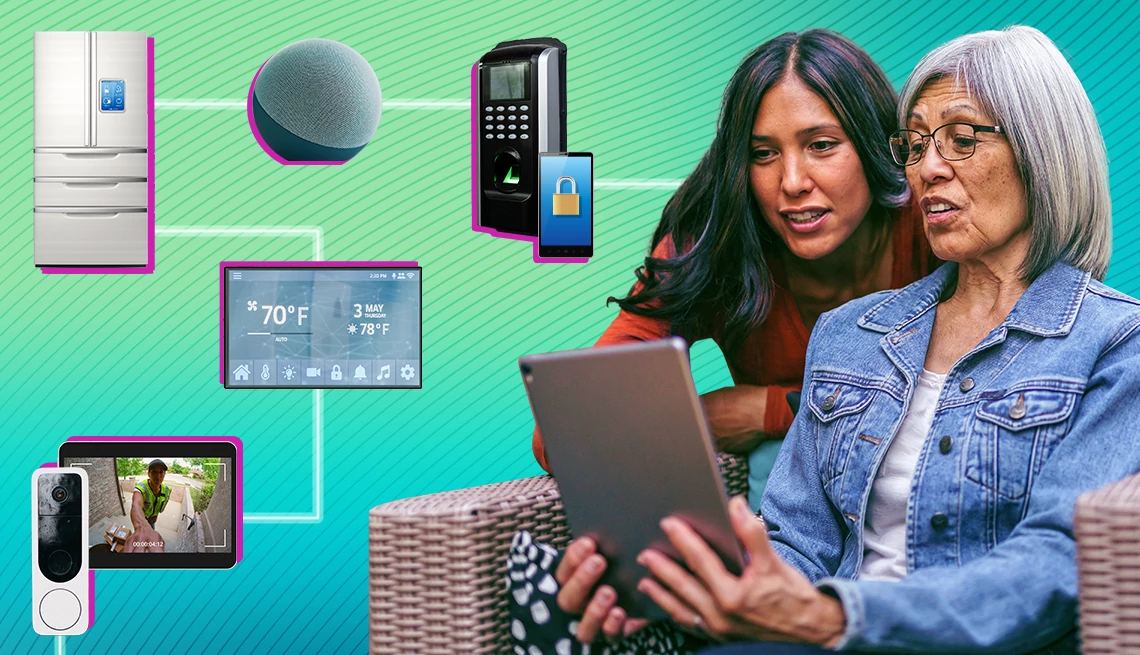
The best devices for seniors right now
Let’s look at some specific devices that are particularly well-suited for seniors. Smart speakers, like the Amazon Echo (starting around $50) and Google Nest Mini (around $30), are a great entry point. They can play music, answer questions, make calls, and control other smart devices with simple voice commands.
Beyond basic voice control, consider smart lighting. Philips Hue, for example, offers a range of smart bulbs and fixtures that can be controlled remotely or with voice commands. This can be incredibly helpful for seniors with mobility issues, reducing the need to get up and down to turn lights on and off. A starter kit typically costs around $70.
Smart thermostats, such as the Nest Learning Thermostat ($250) or ecobee SmartThermostat ($200), can automatically adjust the temperature based on your preferences and schedule, saving energy and ensuring comfort. Voice control allows for adjustments without needing to fiddle with small buttons. These devices learn routines and can even detect when someone is home or away.
For medication reminders, voice-activated assistants are invaluable. You can set reminders through the smart speaker itself, or use a dedicated skill or app. There are also specialized devices like the Hero Medication Reminder ($129/year subscription), which not only provides reminders but also dispenses medication. Reliability is paramount with medication management, so choose a system with strong reviews and a clear track record.
Fall detection systems are often brought up, and there are options like Apple Watch with Fall Detection (requires an iPhone and cellular service). However, it’s important to be realistic about these systems. They aren't foolproof, and false alarms can be a concern. They should be considered as an additional layer of safety, not a replacement for other precautions. Costs vary significantly depending on the device and subscription plan.
- Amazon Echo: A $50 speaker that handles basic voice commands and calls.
- Google Nest Mini: Affordable and easy-to-use smart speaker.
- Philips Hue: Smart lighting system for convenient control.
- Nest Learning Thermostat: Smart thermostat for energy savings and comfort.
- Hero Medication Reminder: A machine that dispenses pills on a schedule for a $129 annual fee.
- Apple Watch (with Fall Detection): Wearable device with fall detection capabilities.
Featured Products

Room-filling sound with nearly 3x bass · Designed for Alexa+ · Graphite Recycled Content Certification
Provides easy voice control for music, information, and smart home management, enhancing daily convenience.

White & Color Ambiance smart bulbs · Dimmable lighting · Compatible with Alexa, Google Assistant, SmartThings, and Apple HomeKit
Allows for voice-controlled lighting adjustments, setting moods, and automating routines for enhanced comfort and safety.

Smart, programmable Wi-Fi thermostat · Energy-saving features · Remote temperature control via app
Enables voice control over home temperature, ensuring comfort and potentially reducing energy costs.

24/7 emergency help · Waterproof design · Optional fall detection
Provides immediate access to emergency services and peace of mind through a simple, wearable device.

31-slot automatic medication organizer · Bluetooth alarms and reminders · Fingerprint & mechanical dual lock
Helps ensure medication adherence with timely alerts and secure dispensing, reducing the risk of missed or incorrect doses.
As an Amazon Associate I earn from qualifying purchases. Prices may vary.
Beyond the Basics: Expanding Your Smart Home
Once you’re comfortable with the essentials, you can explore more advanced options. Smart locks allow you to lock and unlock your doors remotely, which can be helpful for family members or caregivers. August Smart Lock Pro ($279) is a popular choice, offering keyless entry and activity monitoring.
Smart kitchen appliances can also add convenience. A voice-controlled coffee maker, for example, can start brewing your coffee before you even get out of bed. While a smart refrigerator might seem excessive, some models offer helpful features like inventory management and expiration date tracking. These features can be quite helpful for seniors who have difficulty remembering things.
Integration with telehealth services is another promising area. Some smart devices can now connect with remote monitoring systems, allowing healthcare providers to track vital signs and provide virtual consultations. This is particularly beneficial for seniors with chronic health conditions. It's important to make sure any telehealth integration complies with HIPAA regulations.
However, a reliable internet connection is crucial for all of these devices to function properly. A stable and fast connection is non-negotiable. Consider a dedicated internet plan with sufficient bandwidth to support all your smart home devices.
Privacy and security
It’s essential to address the legitimate concerns around security and privacy with smart home devices. These devices are collecting data, and it's important to understand what data is being collected and how it’s being used. Strong passwords are the first line of defense. Use a unique, complex password for each device and account.
Two-factor authentication adds an extra layer of security by requiring a second form of verification, such as a code sent to your phone. Enable this whenever possible. Regularly review the privacy settings on each device and app, and disable any features you’re not comfortable with.
Be wary of scams targeting seniors. Scammers may try to gain access to your smart home devices by posing as technical support or offering fake updates. Never share your passwords or personal information with anyone you don’t trust. It’s better to err on the side of caution.
Consider using a separate Wi-Fi network for your smart home devices, isolating them from your computers and mobile devices. This can help to limit the potential damage if one of your devices is compromised. Regularly update the firmware on your devices to patch security vulnerabilities.
- Use strong, unique passwords for each device.
- Enable two-factor authentication whenever possible.
- Regularly review privacy settings.
- Be wary of scams and unsolicited requests for information.
- Consider a separate Wi-Fi network for smart home devices.
Installation & Support: Getting Help When You Need It
Installation can be a hurdle for some seniors. Many devices are designed for DIY setup, but professional installation services are available. Best Buy and other retailers offer installation services for a fee, typically ranging from $100 to $300 depending on the complexity of the setup.
Family members can also provide valuable assistance with installation and ongoing support. Clear documentation and user-friendly setup processes are crucial. Many manufacturers offer online tutorials and phone support. Amazon and Google both have dedicated support lines for their smart home products.
Don’t hesitate to ask for help if you’re struggling. Local senior centers or community organizations may offer technology training classes. It’s important to find a support system that you feel comfortable with. A little patience and guidance can go a long way towards making your smart home experience a positive one.
Robotics & The Future of Eldercare
Emerging technologies like Eldercare robots are starting to appear, offering potentially significant benefits for aging in place. Researchers at MIT, as reported in MIT News, are developing robots that can assist with sitting, standing, and even catching people if they fall. These robots aren't intended to replace human caregivers, but to provide an additional layer of support.
The research from pmc.ncbi.nlm.nih.gov evaluating human-robot interactions highlights that successful implementation depends on creating robots that are intuitive and trustworthy for older adults. It’s about building robots that can seamlessly integrate into daily life and provide meaningful assistance.
However, it’s important to emphasize that this technology is still evolving. The cost of these robots is currently prohibitive for many, and their capabilities are still limited. It’s not a solution for everyone, and it’s crucial to have realistic expectations. We’re likely to see more advancements in this area in the coming years, but it will take time for these robots to become widely accessible.

No comments yet. Be the first to share your thoughts!