

Tech for seniors is changing
My grandmother, bless her heart, still calls me to ask how to check her email on her phone. It’s a familiar story. Many seniors feel left behind by rapidly evolving technology, and it’s a real barrier to staying connected with family and friends. It’s not just about keeping up with the grandkids; access to telehealth, online banking, and even simple entertainment relies on comfortable tech use.
The need for connection is growing, but so is the frustration. Traditional smartphones and tablets, while powerful, can be overwhelming. Small text, complicated menus, and the constant fear of accidentally deleting something are common complaints. Thankfully, 2026 is bringing a wave of devices specifically designed to address these challenges.
There’s a difference between wanting technology and wanting easy technology. Many seniors don’t need the latest and greatest features; they need something reliable, intuitive, and simple to use. The market is responding with "simplified’ devices, but the term itself can be misleading. It"s about finding the right balance between functionality and usability.
Companies are finally making phones that don't require a computer science degree. We're seeing more pre-configured devices and better voice control. It's a good shift, but the sheer number of options makes it hard to choose the right one.
What's new with smartphones in 2026
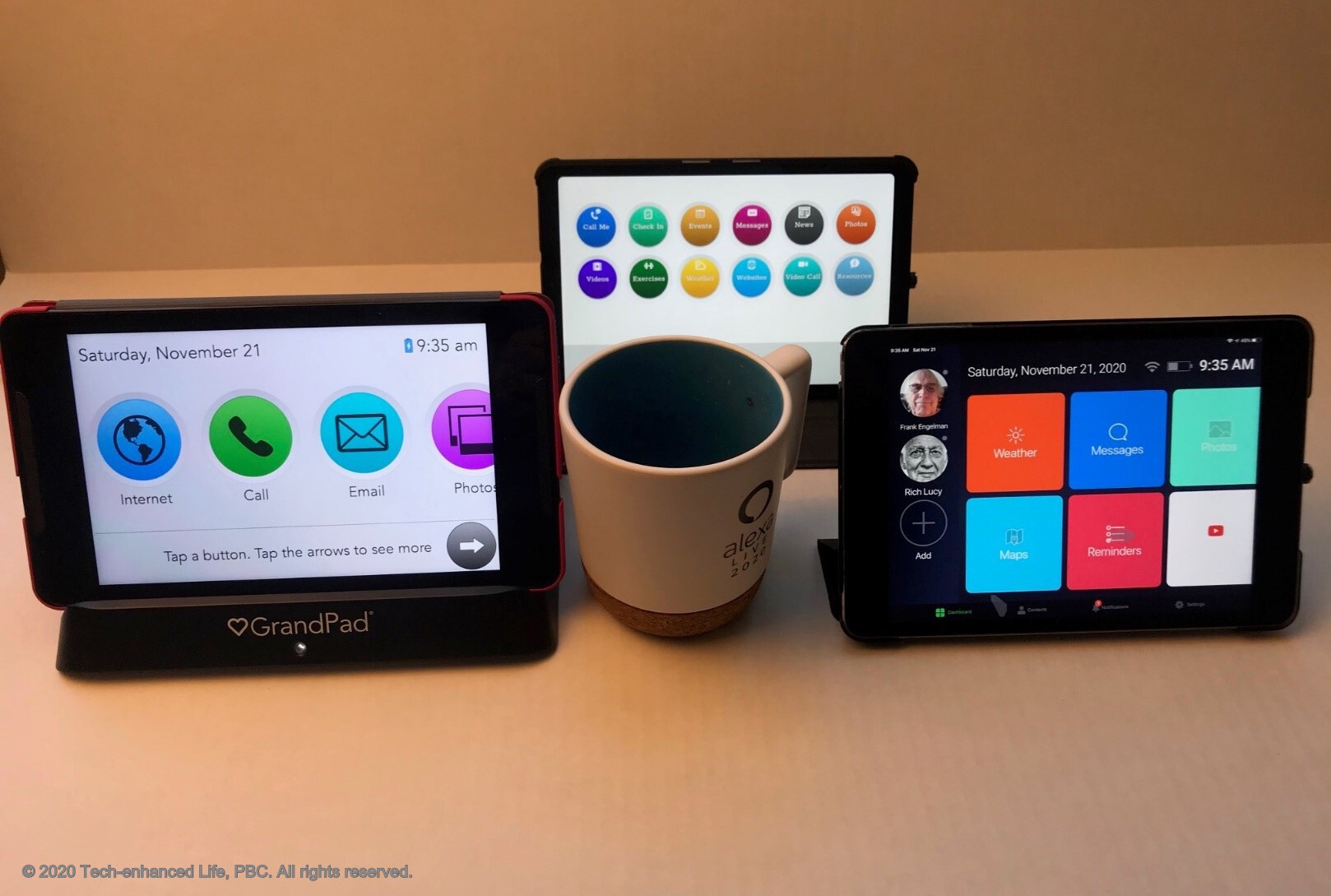
Smartphones designed for seniors aren’t about stripping away all features; they’re about presenting them in a more accessible way. The biggest changes in 2026 focus on the user interface. Think larger icons, simplified menus with fewer layers, and customizable home screens. Seniorliving.org highlights the Lively Flip 2 as a standout, praising its easy-to-use interface and dedicated urgent response button.
Voice control is becoming increasingly important, and most senior-focused smartphones now offer robust voice assistant integration. This allows users to make calls, send texts, and even check the weather without touching the screen. SeniorStar.com points to the GrandPad OS smartphone as a leader in this area, noting its particularly intuitive voice commands and remote support capabilities.
Emergency assistance is another key feature. Many smartphones now include dedicated SOS buttons that connect directly to emergency services or pre-selected contacts. Some even offer fall detection, though I’m not entirely convinced of the reliability of current fall detection technology – false alarms are a real concern.
One growing trend is pre-configured smartphones. These phones come with essential apps already installed and optimized for ease of use. This eliminates the need for seniors to navigate app stores and worry about downloading the wrong thing. However, this convenience often comes at a cost – fewer customization options.
There are trade-offs. Simplified menus usually mean basic cameras. If you just want to video chat with grandkids, these phones are great. If you're a hobbyist photographer, you'll probably find the hardware frustrating.
Remote access for family support is a valuable feature. Many senior smartphones allow trusted family members to remotely manage settings, install apps, and provide technical assistance. This can be a lifesaver for seniors who need a little extra help.
The big screen advantage
Tablets offer several advantages for seniors, primarily due to their larger screens. This makes it easier to read text, view photos, and video chat. The larger size can also make touch interactions simpler, especially for those with dexterity issues. The YouTube channel SeniorLiving.Org featured several tablets in their 2026 roundup, emphasizing the benefits of larger displays for video calls.
Tablets are excellent for activities like reading digital books and magazines, which can be displayed in larger fonts. They’re also great for digital photo frames, allowing seniors to easily view and share photos with family. Many tablets also offer access to a wider range of apps than simplified smartphones.
However, tablets aren’t always the easiest option. Someone who has never used a touchscreen device before might find a tablet just as daunting as a smartphone. The larger size can also make them less portable. It really depends on the individual’s comfort level and technical aptitude.
SeniorStar.com recommends the Amazon Fire HD 10 for seniors, citing its affordability, ease of use, and access to a wide range of apps. They particularly highlight the ability to customize the home screen with large, easy-to-tap icons. It’s a good option, but the Amazon interface isn’t for everyone.
The larger screen isn’t automatically a benefit. If a senior struggles with fine motor skills, accurately tapping on smaller elements within apps can be difficult, even on a larger display. A stylus can help with this, but it adds another layer of complexity.
Features that actually matter
Regardless of whether you choose a smartphone or a tablet, certain features are crucial for seniors. Screen size and clarity are paramount. Look for devices with high-resolution displays and adjustable brightness settings. A larger screen minimizes eye strain, and clear visuals make everything easier to see.
Sound quality is equally important. Many seniors experience age-related hearing loss, so a device with loud and clear speakers is essential. Consider models with hearing aid compatibility. Volume control should be easy to access and adjust.
Battery life is another critical factor. A device that needs to be charged multiple times a day is simply impractical. Look for models with long battery life and easy-to-use charging methods. Wireless charging can be particularly convenient.
Ease of charging ties into battery life. Simple, magnetic charging connectors are much easier to manage than fiddly USB-C ports. A charging stand can also be a helpful accessory.
Emergency features like SOS buttons and fall detection can provide peace of mind. While, as I mentioned, fall detection isn’t foolproof, it can be a valuable safety net. Ensure the device connects to reliable emergency services.
Finally, accessibility options are vital. Voice control, text-to-speech, and adjustable font sizes can make a huge difference for seniors with visual or physical impairments. And don’t underestimate the importance of reliable customer support – a responsive and helpful support team can save a lot of frustration.
- Large screens with high resolution to help with eye strain.
- Loud and clear audio
- Long battery life
- Simple charging
- SOS button
- Accessibility options (voice control, text-to-speech)
- Reliable customer support
Setting Up & Support: Avoiding Frustration
The initial setup of a new device can be the most daunting part for many seniors. If possible, have a family member handle the setup remotely or in person. Most smartphones and tablets offer remote access features that allow trusted contacts to provide assistance.
In-home tech support services are also available, but they can be expensive. Consider local computer repair shops or services specifically tailored to seniors. It's important to verify the credentials and reputation of any tech support provider.
YouTube is a surprisingly valuable resource. Channels like SeniorLiving.Org offer clear and concise tutorials on how to use various devices and apps. Online guides and forums can also provide helpful tips and troubleshooting advice.
Unfortunately, seniors are often targeted by tech scams. Be wary of unsolicited phone calls or emails asking for personal information. Never click on links from unknown sources. Educate seniors about common scams and how to protect themselves. Data privacy is also important; help them adjust privacy settings to limit data collection.
Featured Products

Designed specifically for seniors · Large icons and simple interface · Requires activation with a Lively phone plan
This smartphone offers a simplified user experience with large icons and essential features, making it a good entry point for seniors transitioning to a smartphone.
![GrandPad Easy to Use Tablet & Phone for Seniors [Locked - Not Compatible with Other Wireless Carriers - Requires a Plan]](https://m.media-amazon.com/images/I/71a8qifkobL._AC_UY654_QL65_.jpg)
Combines tablet and phone functionality · Intuitive, simplified interface · Requires a GrandPad plan for service
The GrandPad provides a highly simplified and integrated experience for both calling and browsing, ideal for seniors who want a single, easy-to-manage device.

Classic flip phone design · Prepaid service option · Basic calling and texting functionality
This feature phone is recommended for its straightforward operation and familiar flip design, perfect for seniors who prioritize basic communication needs.

8-inch HD display · 3GB memory, 32GB storage · Designed for portable entertainment and browsing
The Amazon Fire HD 8 tablet offers a user-friendly interface for browsing, reading, and entertainment, with a large screen that can be easier for seniors to navigate.

Large buttons and clear sound · SOS button for emergencies · Includes SIM card and charging dock
This flip phone is designed with seniors in mind, featuring large buttons, loud audio, and an SOS function for enhanced safety and ease of use.
As an Amazon Associate I earn from qualifying purchases. Prices may vary.
Standout Devices: Worth a Closer Look
The GrandPad OS Smartphone really stands out for its simplicity. The interface is incredibly clean and intuitive, with large icons and minimal clutter. The remote support feature is a huge benefit, allowing family members to easily assist with technical issues. However, the monthly subscription cost is a significant drawback for some.
The Amazon Fire HD 10 is a great value for the money. The large screen is perfect for viewing photos and videos, and the access to Amazon services is a plus for those who are already Amazon users. The interface isn’t as streamlined as the GrandPad, but it’s still relatively easy to navigate. It’s a solid choice for seniors who want a versatile tablet without breaking the bank.
Finally, the Lively Flip 2 is a good option for seniors who prefer a traditional flip phone experience. It’s simple, reliable, and has a dedicated urgent response button. It's not a smartphone, but it provides essential communication features in a familiar format.

LIVELY Jitterbug Smart4 Smartphone for Seniors - Cell Phone for Seniors - Not Compatible with Other Wireless Carriers - No SIM Needed - Must Be Activated Phone Plan
- Large, bright screen with simple icons
- Voice-controlled "Urgent Response" button
- Easy-to-navigate menu and large text options
The Jitterbug Smart4 offers a streamlined smartphone experience tailored for seniors, making it an excellent example of a simplified smartphone option for those new to mobile technology.
View on Amazon →As an Amazon Associate I earn from qualifying purchases.
No comments yet. Be the first to share your thoughts!